Corporate currency at AcademyOcean: study points
Corporate Currency in AcademyOcean: Learning That Earns Rewards
An employee completes a course, passes an exam, and earns a certificate. For the administrator, this is a successful result in a report. For the employee, it means a “Completed” status and the next course on the list. Now, every achievement can have tangible value.
Corporate Currency is now available in AcademyOcean. It is an internal points system that rewards learners for training and achievements. Learners accumulate points and spend them in the gift shop, while administrators define the earning rules, set exceptions, and manage each learner’s balance.
This is the second part of AcademyOcean’s motivation system. The gift shop answers the question, “What can learners spend their points on?” Corporate Currency answers, “How can they earn points, and how can those points be managed?”
These are internal academy points, not real money or a payment method.
From a Completed Course to a Tangible Reward
Gamification works better when learners understand the connection between an action and its outcome.
Complete a course and earn points. Pass an exam on the first attempt and receive an additional bonus. Earn a certificate and see new points added to your balance. Accumulate enough points and exchange them for a gift.
This creates a complete cycle: learning activity → points earned → transparent balance → reward from the gift shop.
For L&D and HR teams, this means that motivation rules are stored in the same system where training takes place. There is no need to maintain a separate spreadsheet of learner balances or manually reconstruct the history to determine who received a reward, when they received it, and what they earned it for.
Which Activities Earn Points?
The Point Settings tab is available in the Gift Shop section. Here, administrators determine which learning activities should be rewarded and how many points learners receive for completing them.
The Learning section covers:
- course completion;
- quiz completion;
- exam completion.
In the Achievements section, administrators can configure rewards for earning a certificate or badge.
Each activity has its own toggle. When the toggle is enabled, a field appears where the administrator can specify the number of points to award. If a particular type of activity should not affect the learner’s balance, point accrual can be disabled.
The Activity & Streaks section is not yet available. Points for activity and consecutive learning days are planned for future versions.
Academy-Wide Rules and Exceptions for Individual Courses
The same reward for every learning activity will not suit every training program.
Completing a short introductory course and passing a complex certification require different levels of effort. Corporate Currency therefore combines global rules with individual settings.
The Points section in the settings of each course, quiz, and exam offers three options:
- Use Global — apply the general rule configured in Point Settings;
- Custom — set a custom number of points;
- Do Not Award Points — award no points for this activity.
For example, a company can award a standard number of points for most mandatory courses and set a higher reward for a complex product certification. A supplementary course that should not affect the motivation system can be excluded from point accrual entirely.
The View Custom Points button opens a list of courses, quizzes, and exams with individual settings. This allows administrators to see all exceptions in one place.
If global point accrual for a particular activity type is disabled in Point Settings, the Points section within the corresponding course, quiz, or exam is unavailable. A tooltip explains why and provides a link to the global settings page.
Additional Points for Passing on the First Attempt
A separate bonus is available for passing quizzes and exams on the first attempt.
The administrator enables the bonus and determines how many points it is worth. This makes it possible to reward not only the completion of an activity but also a successful result achieved without additional attempts.
Changes to the rules affect only future point accruals. If an administrator increases or decreases the number of points awarded, completed transactions are not recalculated.
This keeps the history consistent: learners retain the number of points that applied when they completed the activity.
Learner Balance and Transaction History
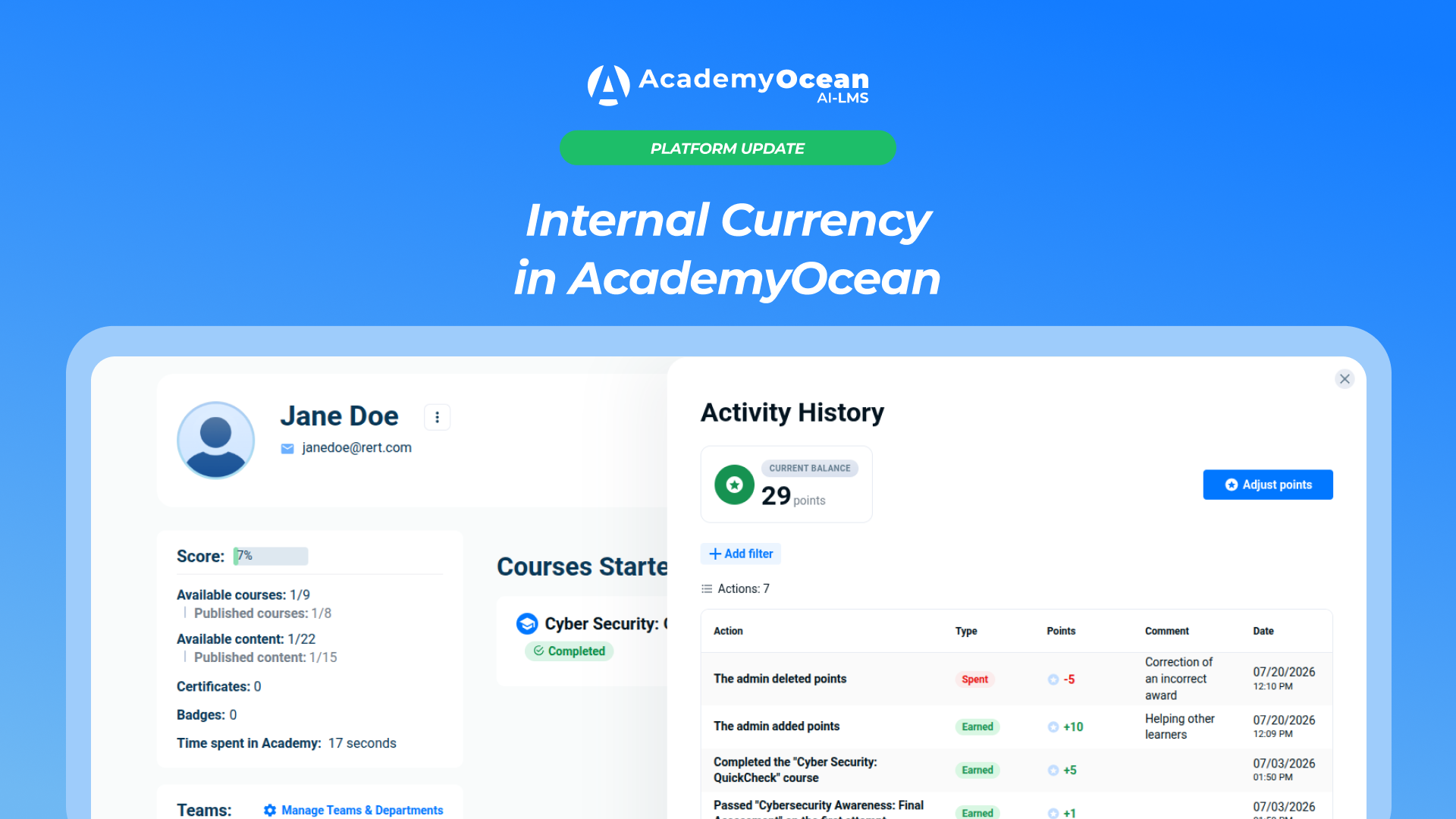
A Points section showing the current balance is available in each learner’s profile.
Through Activity History, administrators can access a complete record of all points earned and spent. It shows:
- the activity for which points were earned or deducted;
- the transaction type — Earned or Spent;
- the number of points;
- the comment explaining a manual balance adjustment;
- the transaction date.
The history includes automatic point accruals for courses, quizzes, exams, certificates, and badges, as well as manual adjustments and gift shop purchases.
If a learner asks why their balance has changed, the administrator does not need to search across several systems. The complete sequence of transactions is stored in one log.
Manual Balance Adjustments
Not every motivation scenario can be covered by predefined automated rules.
Using Adjust Points, an administrator can manually add or deduct points and specify the reason for the change.
For example, administrators can award a one-time bonus for an achievement outside the standard training program or correct an incorrect transaction. The comment is saved in the activity history, so every adjustment can be reviewed and explained.
The system does not allow a learner’s balance to fall below zero.
What Learners See
Learners can see their current balance and a History tab containing all points earned and spent. They do not need to ask a manager where their points came from or why their balance has decreased.
Every transaction has a clear source: course completion, earning a certificate, ordering a gift, or a manual adjustment by an administrator.
As a result, points are no longer an abstract number. Learners understand the rules and can see which learning activities bring them closer to their next reward.
How Points Work in the Gift Shop
Accumulated points can be spent when placing an order in the gift shop. If the learner’s balance is insufficient, the order button remains inactive. Learners cannot spend more points than they have available.
When an order is cancelled, the deducted points are returned to the learner’s balance. The transaction is also recorded in the activity history.
Together, the gift shop and Corporate Currency create a unified motivation system: the administrator defines the rules, the learner earns points for making progress, and those points can be exchanged for available rewards.
Who Can Benefit from Corporate Currency?
The points system is suitable for companies that want to encourage long-term engagement in training and reward specific results.
For example, it can be used for onboarding new employees, ongoing product training, mandatory certification, or developing internal expertise through badges.
Global rules help maintain consistent logic across the entire academy. Individual settings make it possible to account for the complexity of a specific course or exam. Manual adjustments cover situations that cannot be automated.
Administrators retain control over the system, while learners understand how their progress translates into rewards.
How to Set Up the Points System
Corporate Currency does not determine which activities matter most to your company. That decision remains with your L&D or HR team.
Before configuring the system, answer five questions:
- Which learning activities should earn points?
- How should the number of points reflect the difficulty of courses and exams?
- Where are individual rules or first-attempt bonuses needed?
- In which situations should administrators be allowed to adjust balances manually?
- Which gift shop rewards will genuinely matter to your team?
Start with a few simple and easy-to-understand rules. Evaluate how they work in practice, then gradually adapt the system to your training program.
Corporate Currency Is Now Available in AcademyOcean
AcademyOcean now brings learning activities, point accrual, and rewards together in a single process. Administrators define the rules, manage balances, and review the history of every transaction. Learners understand why they receive points, how many they have accumulated, and what they can spend them on.